
Create a CV
Write a CV with the AI from a few sentences, an old CV or a job posting, edit it on the page, and export it as PDF or Word.
Updated October 12, 2026
Craftkite writes CVs as well as apps. Describe the job you want, import the CV you already have, or start from one of the CV templates. The result is a real document you edit on the page, keep versions of and export as PDF or Word.
Start a CV
- On Home, choose CV in the menu under the description field.
- Pick how to start:
- Describe it: the role you are aiming for, your experience, education and skills. Answer a few questions fills in a request for you.
- Templates: choose a design. Starting from a template is free; the sample text is replaced when the AI writes your CV.
- Start blank: an empty CV you fill in yourself, free.
- Craftkite writes a short plan first. Approve it, or ask for changes. Then it writes the CV in the document language you chose.
The AI never invents facts about you: employers, dates, degrees, numbers and contact details come only from what you wrote or uploaded. Where something is missing, you see a placeholder in square brackets, such as “[Company]”, to fill in.
Edit it on the page
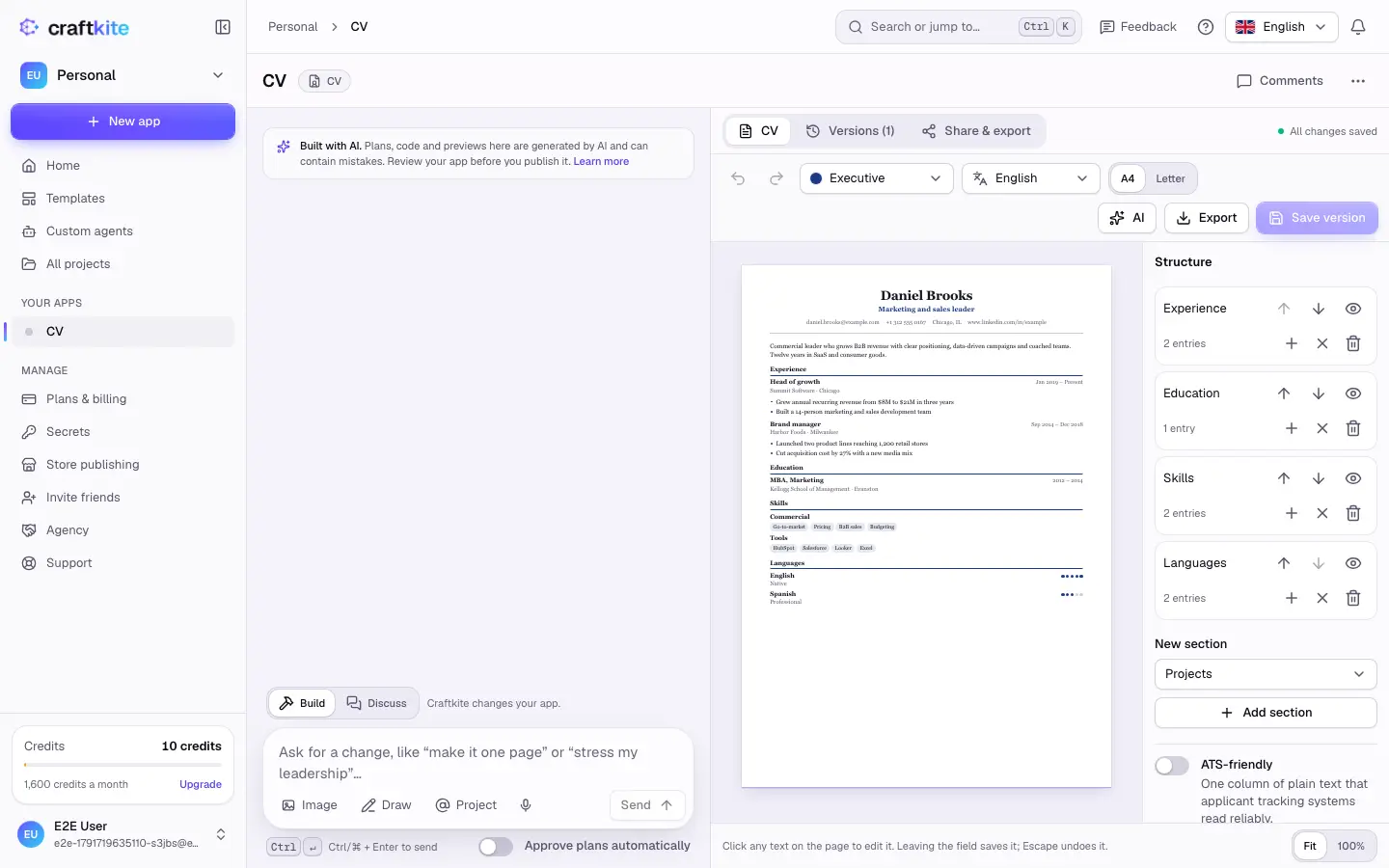
- Click any text on the page to change it. Leaving the field saves it; Escape undoes it.
- Use Structure to reorder, hide or add sections and entries, add a photo and choose the date format.
- Switch the template, page size (A4 or Letter) and document language at the top.
- ATS-friendly turns the CV into one column of plain text that applicant tracking systems read reliably.
- Save version keeps the current state; Versions lets you look back and restore.
Let the AI help
The AI menu has actions for CVs, each with its price shown next to it:
- Import my CV: upload a PDF, a Word file, text or a photo of your current CV. Your facts and wording are kept.
- Tailor to a job: paste a job posting or its link. The CV is reordered and rephrased truthfully so the most relevant experience and the posting’s keywords stand out. Nothing you have not done is added.
- Rewrite in another language, or type any change in the chat, for example “make it one page” or “stress my leadership”.
Uploaded files and job postings are only used to write your CV, and instructions hidden inside them are ignored.
Export and share
Open Share & export or the Export menu:
- PDF in the page size you choose, with real, selectable text.
- Word document: an editable file for job portals that ask for Word. It is a plain, one-column file (headings, bullet lists, contact details, no photo) that application systems read reliably.
- Public link: a read-only web page of your CV. It is hidden from search engines by default; you can turn the link off or replace it at any time.
Exports and sharing are free. Downloaded files stay available for a limited time; export again to get a new file.