Social media
How to plan social media content and schedule posts
Describe a campaign and Craftkite designs the posts in your brand, writes captions and hashtags, plans them on a calendar and publishes them to your connected accounts at the times you choose.
By Craftkite Academy2 min read

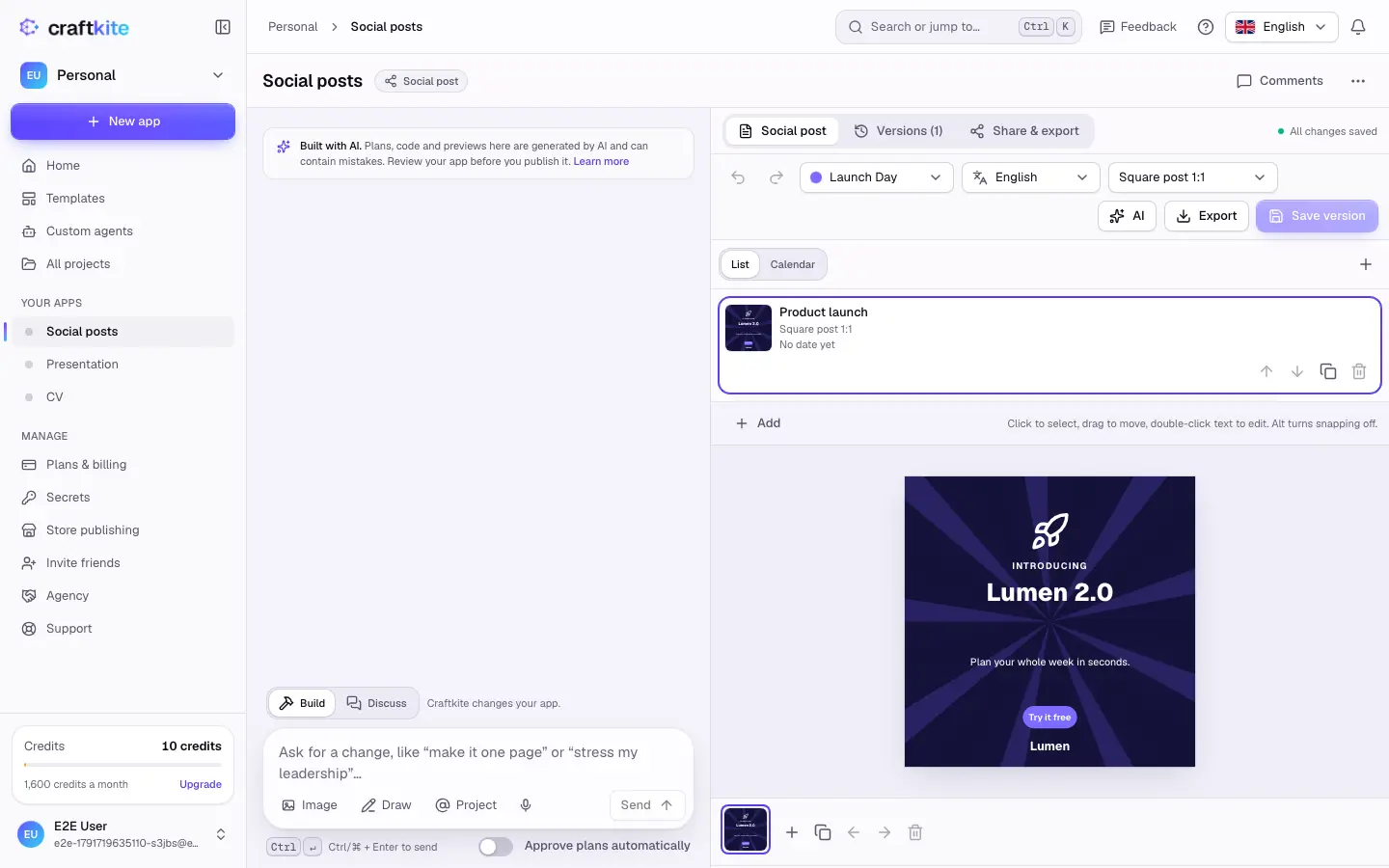
A social media set is a campaign of posts: square and portrait posts, stories, carousels, covers and banners, each with its design, caption, hashtags and a planned date. Craftkite designs and writes them; you edit them on a canvas and either export them or, where your plan includes social publishing, schedule them to your own accounts.
1. Describe the campaign
On Home, choose Social post under the description field. Describe what you promote, for whom, how many posts and when, for example “10 posts for my coffee shop’s autumn campaign, two a week from October”. Or start from a template. Approve the plan, and Craftkite writes and designs the posts and plans their dates.
2. Set your brand kit
Open Brand kit to set the name, handle, website, logo, colours and fonts. Every design in the set uses them, so the whole campaign looks like you.
3. Edit designs and captions
Click a layer on the canvas to select it, drag to move it and double-click text to edit it. Caption holds the text, hashtags and target platforms, with counters for each platform’s limits. The AI menu can change one post or all posts, rewrite the caption tone or make an AI image for a design; the price of each action is shown in the menu.
4. Plan the dates on the calendar
Switch from Posts to Calendar and drag posts onto days. Exports are free: a PNG or JPG at the exact size of each format, carousels as a ZIP or PDF, and captions as a CSV or text file.
5. Connect accounts and schedule
Open Social accounts in the studio menu, choose a network and click Connect. You sign in on the network’s own page; Craftkite never sees your password. Then select posts in the set, click Schedule, choose the accounts and when: Now, Pick dates, Weekly or Spread out. The summary shows how many publications will be made and what they cost before you confirm.
Craftkite checks every post against each network’s rules for formats, carousels and caption length before anything goes out, and the calendar shows each publication’s status.
Questions about this guide
Which networks can I publish to?
Instagram, Facebook, LinkedIn, TikTok, Pinterest and Threads, using the accounts you connect. What you can connect differs per network, for example Instagram needs a professional account.
When are credits taken for a scheduled post?
Only when the post is published. If it fails, the credits come back automatically. Scheduling, rescheduling, pausing and cancelling are free.
Can I edit a post after scheduling it?
Yes. You can keep editing until its time; Craftkite publishes the post as it is at that moment.
Is social publishing on every plan?
No. It must be included in your plan; the studio shows which plans include it. Designing and exporting posts works on every plan.