
Security scan of your app
Check your app’s code for common security mistakes for free, understand each finding and let Craftkite fix it as a normal change.
Updated October 22, 2026
Every app Craftkite builds can be scanned for the security mistakes that most often hurt real apps. The scan reads the code of the current version; it never runs or changes your app, and it costs nothing.
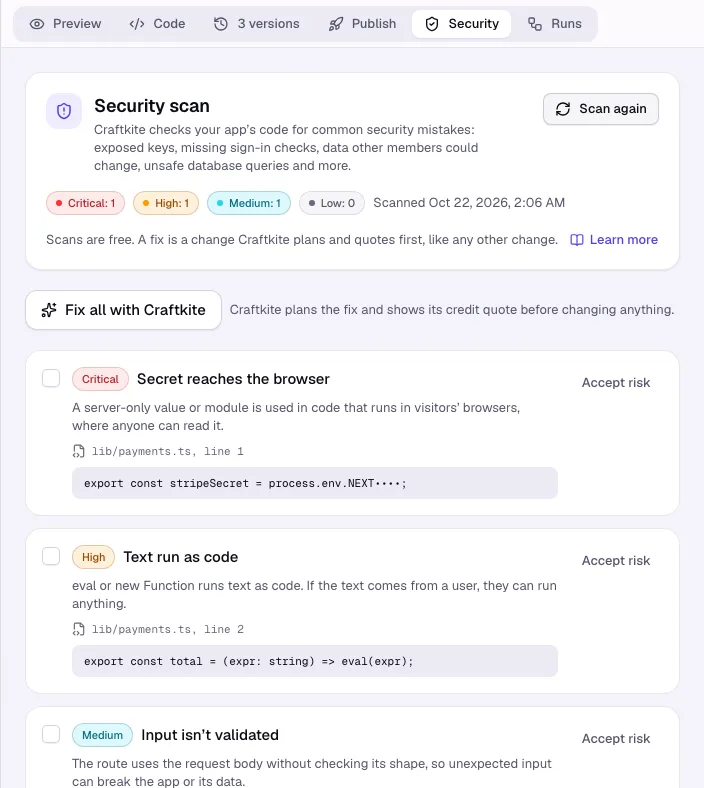
Scan your app
- Open your project and the Security tab.
- Click Scan now (or Scan again). The result appears in a moment, grouped by severity: Critical, High, Medium and Low.
- Each finding shows what is wrong in plain words, the file and line, and the line of code itself. Keys in the code are masked.
The app changed after this scan means a newer version exists: scan again to check it.
What the scan looks for
- Live keys, passwords and tokens written into the code, and secrets that reach the browser.
- Routes and server actions that change data without checking who is signed in.
- Updates and deletes that are not limited to the signed-in member’s own rows, so one member could change another member’s data.
- Unsafe database queries, unsafe HTML, text run as code, websites allowed to call your app from anywhere, open redirects, weak sign-in cookies, predictable random values and request bodies used without validation.
- Packages with a published vulnerability, from a list Craftkite keeps up to date.
Fix with Craftkite
Select the findings you want fixed, or none to fix all open ones, and click Fix with Craftkite. Craftkite turns them into one change request with the exact file, line and fix, plans it and shows the credit quote. Nothing changes until you approve it, and the fix costs the same as any other change.
If a finding is intended (for example a public form that anyone may send), click Accept risk. It stays listed as Accepted risk and no longer counts; Restore takes it back.
Publishing
Every publish scans the version going live. When it finds a Critical issue, Craftkite asks you first: Review issues opens the Security tab, Publish anyway goes ahead, and that decision is recorded. Keys written into the code always stop a publish; move them to Secrets (see Secrets and integrations).
The scan finds common mistakes, not every possible weakness. For apps that handle payments or sensitive data, review access rules carefully as well.