
Upload it yourself
Download the signed IPA or AAB through Craftkite and send it to the App Store with Transporter or to Google Play with Play Console.
Updated November 22, 2026
Craftkite can send your app to the stores for you, but you can also upload it yourself. Open the mobile project’s Publish tab → App stores → I’ll upload it myself (in the Craftkite app: the project’s store screen).
What you get
- The signed build: an IPA for iOS (signed for your Apple team) or an AAB for Android. It is downloaded through Craftkite with a link that works for ten minutes; every download is recorded in the audit log.
- The store listing (ZIP): texts in every language, screenshots for every size, the feature graphic and the icon, with a README.
- The answers: App Privacy, Data safety and content rating answers, review notes and the reviewer’s demo account in the store pre-review.
Start a release first (sending it to the store is optional); the newest build of the platform is offered for download.
App Store with Transporter
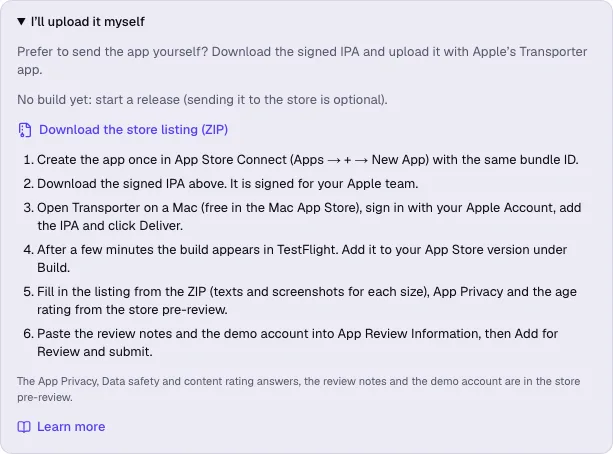
- Create the app once in App Store Connect (Apps → + → New App) with the same bundle ID.
- Download the signed IPA.
- Open Transporter on a Mac (free in the Mac App Store), sign in with your Apple Account, add the IPA and click Deliver.
- After a few minutes the build appears in TestFlight. Add it to your App Store version under Build.
- Fill in the listing from the ZIP, and App Privacy and the age rating from the store pre-review.
- Paste the review notes and the demo account into App Review Information, then Add for Review and submit.
Google Play with Play Console
- Download the signed AAB.
- In Play Console create the app (Create app) with the same name; the first upload sets the package name.
- Test and release → Testing (or Production) → Create new release, upload the AAB and save.
- App content: Data safety (copy it from the store pre-review’s Data safety table), content rating, target audience, ads and the privacy policy URL.
- Main store listing: texts, icon, feature graphic and screenshots from the ZIP.
- Review the release and roll it out.
After this first upload Craftkite can send every later version for you: Google asks for the first upload by hand, and later ones go through the API.
Good to know
- Downloads stay available as long as the build service keeps the build; if a link says the build is gone, start a new release.
- Uploading by hand costs nothing extra: the credits of the build are the same.