
Digital employees
Hire a digital employee to run your live app with you — customer support, bookings and orders, lead follow-up, marketing and reports — inside the limits you set.
Updated November 22, 2026
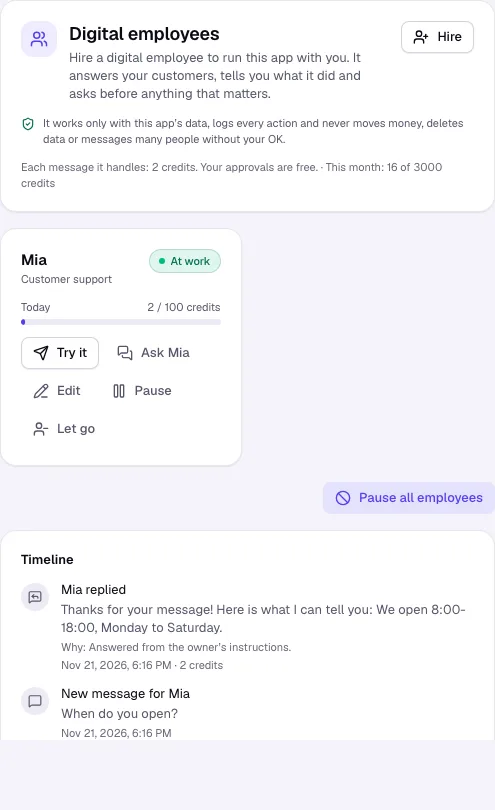
A digital employee works in your live app for you. It answers your customers, keeps bookings and orders moving, follows up with new leads, plans your social posts and sends you reports. It tells you what it did and asks before anything that matters.
Hire one
Open your app and choose the Employees tab (on the phone: open the project, switch to App and choose Digital employees). Choose Hire, then:
- Role: Customer support, Bookings & orders, Lead follow-up, Marketing or Reports.
- What it should know: opening hours, prices, delivery areas, rules. It never invents anything that is not written here.
- Tone and Replies in (your customer’s language, or a fixed one).
- How freely it works per action: Draft only, Ask me first or On its own. Refunds, discounts, deletions and messages to many people always wait for your OK.
- Working hours and a daily credit limit.
The price of each action is shown before you hire. Nothing is charged until it works.
What each role does
- Customer support answers your app’s chat and email in the customer’s language and hands anything tricky to you. With an inbound address set up, customers can also write to the employee’s own email address.
- Bookings & orders confirms new bookings, reminds customers before their appointment, tells them when an order changes, offers a new time after a no-show and passes refund requests to you.
- Lead follow-up welcomes new sign-ups personally and follows up once a few days later; when the lead converts, the follow-up is dropped.
- Marketing picks the week’s posts from your designed social posts and places them in your social calendar once you approve; it can also write a newsletter for people who agreed to receive one (with an unsubscribe link in every email).
- Reports sends you a daily or weekly summary by email and in the app: customer messages, what waits for you, credits used, Stripe payments and your app’s tables. The numbers are counted by Craftkite; the employee only writes the words.
Your inbox and timeline
- Waiting for you lists replies that need your OK, drafts, hand-overs to answer, tool actions (a refund in Stripe, an email, a change in your app’s API) and weekly plans. Approve, edit or decline them. A plain reply can also be read and approved in the push notification on your phone, after unlocking; tool actions, plans and replies built on your business data open the inbox. When a service does not confirm a tool action, it shows as Outcome unknown: it never runs twice — choose Check again or say whether it went through.
- Timeline shows everything the employee did, why, and what it cost.
- Ask answers questions such as “What happened today?” from the employee’s own timeline.
Tools
An employee can use your app’s own API (for apps built as APIs), the integrations you enabled — Stripe, Resend, Slack, Notion, Google Sheets — and the MCP servers connected to this app. Reading happens on its own, and a reply built on what it read waits for your OK; a Stripe lookup for the customer it emails stays limited to that customer. Anything that changes data or sends something waits for your OK and runs exactly as shown.
Credits and limits
Every action has its own price in the credit table: a handled message, a booking action, a lead message, a tool step, a weekly plan, a newsletter, a report and a question you ask the employee. Prices are reserved before the work and charged once it is done; if something fails on our side, the credits come back. Customer messages are read as data, never as orders; messages that look like instructions for an AI go to you unread and are never charged.
Each employee has a daily limit, and all employees of your account share a monthly limit. When a limit is reached the employee pauses and tells you; it carries on by itself when the next action fits again.
Pause, let go, privacy
Pause stops an employee at once; Pause all employees stops every employee of your account. Let go ends its work; its timeline stays with the app. An employee only works with its own app’s data, and your data export includes its settings, timeline and approvals. Visitors’ messages and answers are kept for a set time; to erase one visitor’s data on request, choose Erase a visitor’s data. Deleting your account stops every employee at once.